Twitter Engagement: How To Calculate Your Engagement Rate, What A Good One Looks Like, And 7 Ways To Get More Replies On X
Dickie BushNovember 22, 2026
Twitter engagement in one page: how to calculate your engagement rate on X, what counts as a good one, and 7 habits that get you more replies.
Most people on X look at the wrong number.
They check how many followers they gained, or how many people saw a post, and decide whether it "worked." But a post that 50,000 people scrolled past did less for you than one that 2,000 people stopped and replied to. Followers come from the replies, the reposts and the bookmarks. That's Twitter engagement, and it's the number worth watching.
I've been posting on X for years and went from 3,000 to 250,000 followers during the years I focused on it. To me, tweets are the foundation for idea validation: the ones people engage with tell me which ideas deserve a longer piece.
So here's everything on Twitter engagement in one place: what counts, how to calculate your engagement rate (by impressions and by followers, with a worked example), what a good rate looks like and why the benchmarks disagree, where to find your numbers, and the 7 habits I use to get more replies. Most of those habits start with the first line, so read how to write a hook and keep a few hook examples next to you while you write. And if you want to write, schedule and track your posts in one place, that's what Typeshare for X is for. You do the writing; the robots do the rest.
What Counts As Twitter Engagement
Twitter engagement is every time someone does something with your post, beyond scrolling past it.
The simplest way to think about it: an impression means someone saw your post, and an engagement means they reacted. Every analytics tool counts a slightly different set of actions, but these are the ones that show up everywhere:
- Likes. The lightest signal. A tap that says "I agree" or "nice."
- Replies. The strongest one. Someone cared enough to write back, and a reply starts a conversation other readers can join.
- Reposts. Someone shared your post with their own audience, word for word.
- Quote posts. A repost with their take added on top. These start conversations of their own.
- Bookmarks. Someone saved it to come back to. Quiet, but a sign of real value.
- Clicks. Some tools also count clicks on your links, your profile or your media.
Not all engagement is equal. A like takes half a second. A reply takes a thought. Replies and reposts are the ones to watch first: a repost puts your post in front of someone else's followers, and a reply keeps the conversation going.
That's also why your Twitter engagement depends so much on your first line. Nobody likes, replies to or reposts a post they didn't read.
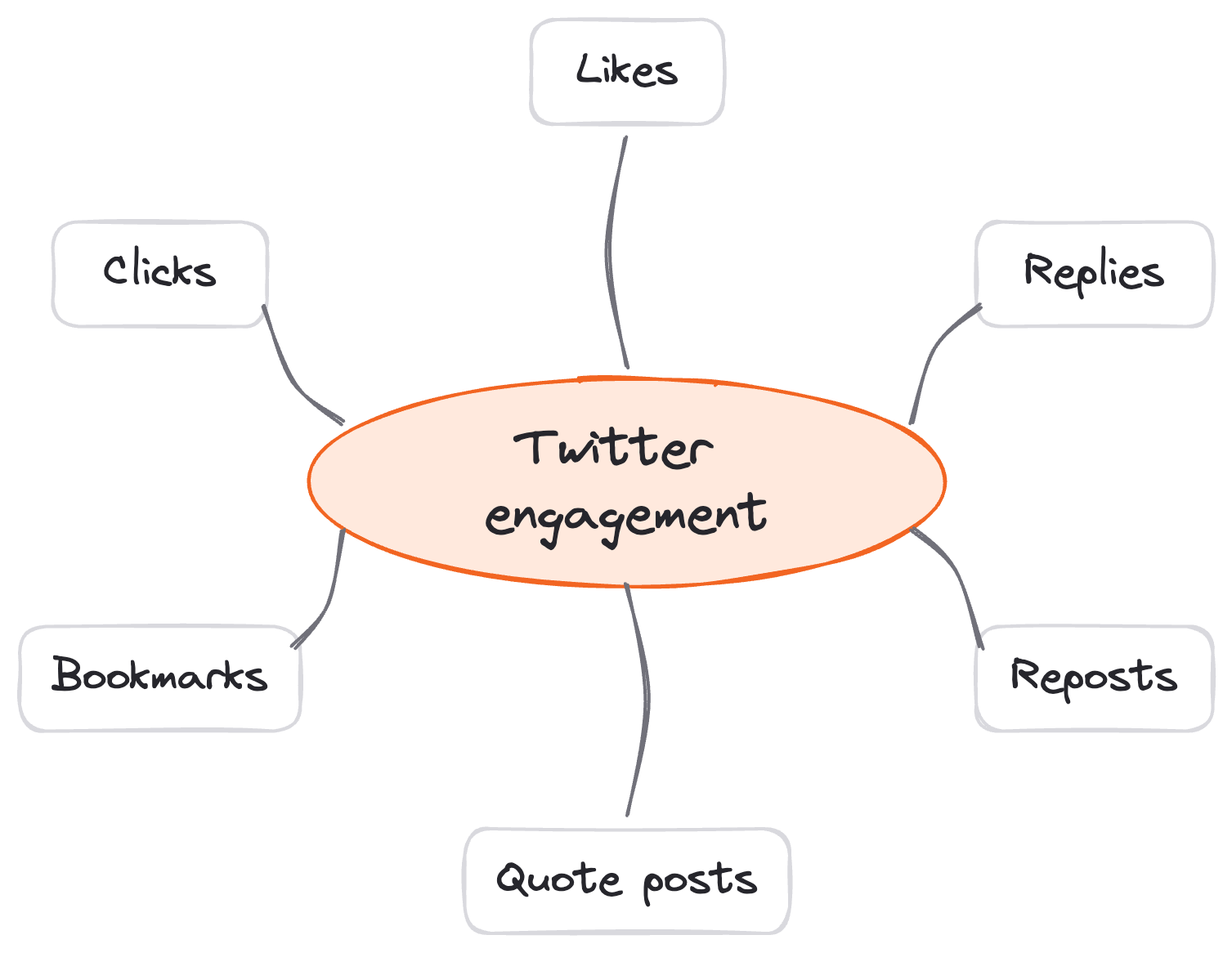
That's what counts as Twitter engagement: anything a reader does besides scrolling past.
How To Calculate Twitter Engagement Rate
Your engagement rate is the share of people who reacted, out of the people you measure against.
There are two common ways to calculate Twitter engagement rate, and they answer different questions. Hootsuite's guide to engagement rate lists both (plus one by reach, which X doesn't show you):
By impressions (how well did this post do with the people who saw it?):
`` Engagement rate = engagements ÷ impressions × 100 ``
By followers (how much does my audience engage with what I post?):
`` Engagement rate = engagements ÷ followers × 100 ``
Here's a worked example, with made-up numbers. Say a post got 10,000 impressions, and you have 5,000 followers. It earned:
- 150 likes
- 20 replies
- 15 reposts
- 10 bookmarks
Add them up: 150 + 20 + 15 + 10 = 195 engagements.
- By impressions: 195 ÷ 10,000 × 100 = 1.95%
- By followers: 195 ÷ 5,000 × 100 = 3.9%
Same post, two different rates. Both are right, because each divides by something different.
Use the impressions version to compare your own posts with each other, because a post that reached more people should be judged against how many saw it. Use the followers version when you compare yourself with a published benchmark, because that's how most of them are calculated (more on that next). Whichever you pick, stick with it, so you're always comparing like with like.


That's how to calculate Twitter engagement rate: engagements divided by impressions (or followers), times 100.
What Is A Good Engagement Rate On Twitter?
Here's an unpopular opinion: the published benchmarks won't tell you much about your own account.
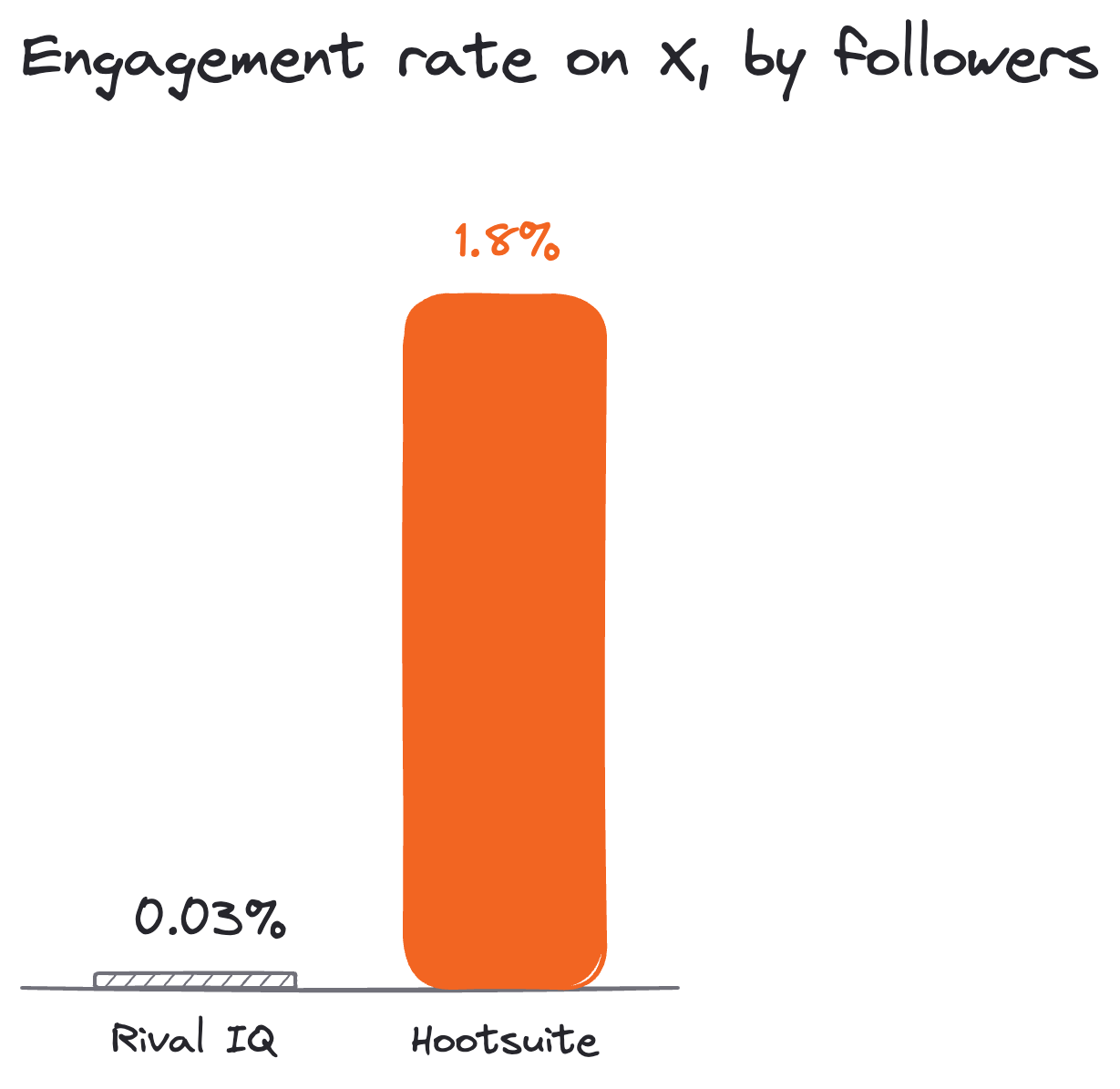
Look up what a good engagement rate on Twitter is and you'll get answers that differ by a factor of 60. Two of the biggest, both checked November 22, 2026:
- 0.03%: the median engagement rate per post on X across all industries in the 2026 Social Media Industry Benchmark Report from Rival IQ (now part of Quid), up from 0.015% the year before. It divides total interactions by follower count.
- 1.8%: the average engagement rate on X in Hootsuite's benchmarks, with industries from 1.7% to 2.5%. It also divides engagements by followers.
How can two followers-based numbers be 60 times apart? They measure different things. The 0.03% is the median of brand accounts' posts across industries. Hootsuite's figures are per industry, for each one's best-performing content type. Change who you measure and which posts you count, and the "good" number moves with it.
So here's what I'd do with them:
- Treat 0.03% as a floor for brand accounts. If you post for a company, anything above it beats the typical brand post.
- Don't hold a personal account to brand numbers. Both benchmarks measure brands. If you post as yourself, use them for scale and nothing more.
- Compare yourself with yourself. Your own average over the last 30 days is the benchmark that matters. A good engagement rate on Twitter is one that beats your average, and keeps rising month after month.
Here's how to find your own benchmark in 15 minutes:
- Pick your last 30 days of posts. Fewer than 20 posts? Use 60 days.
- Write down each post's engagements and impressions. Likes, replies, reposts and bookmarks, plus how many saw it.
- Add them all up. Total engagements divided by total impressions, times 100, is your average.
- Mark your top 5. The posts well above your average tell you what to write more of.
Do it again next month. The number you're trying to beat is the one you just wrote down.
What is a good engagement rate on Twitter? One that's higher than your own was last month.
Where To Find Your Twitter Engagement Numbers
You can't raise a number you never look at.
X shows each post's numbers under the post, and in its analytics you can see impressions and engagements for every post you've published. That works, but it means opening posts one at a time and doing the math yourself, and it only covers X.
Typeshare's Analytics page does that math for you:
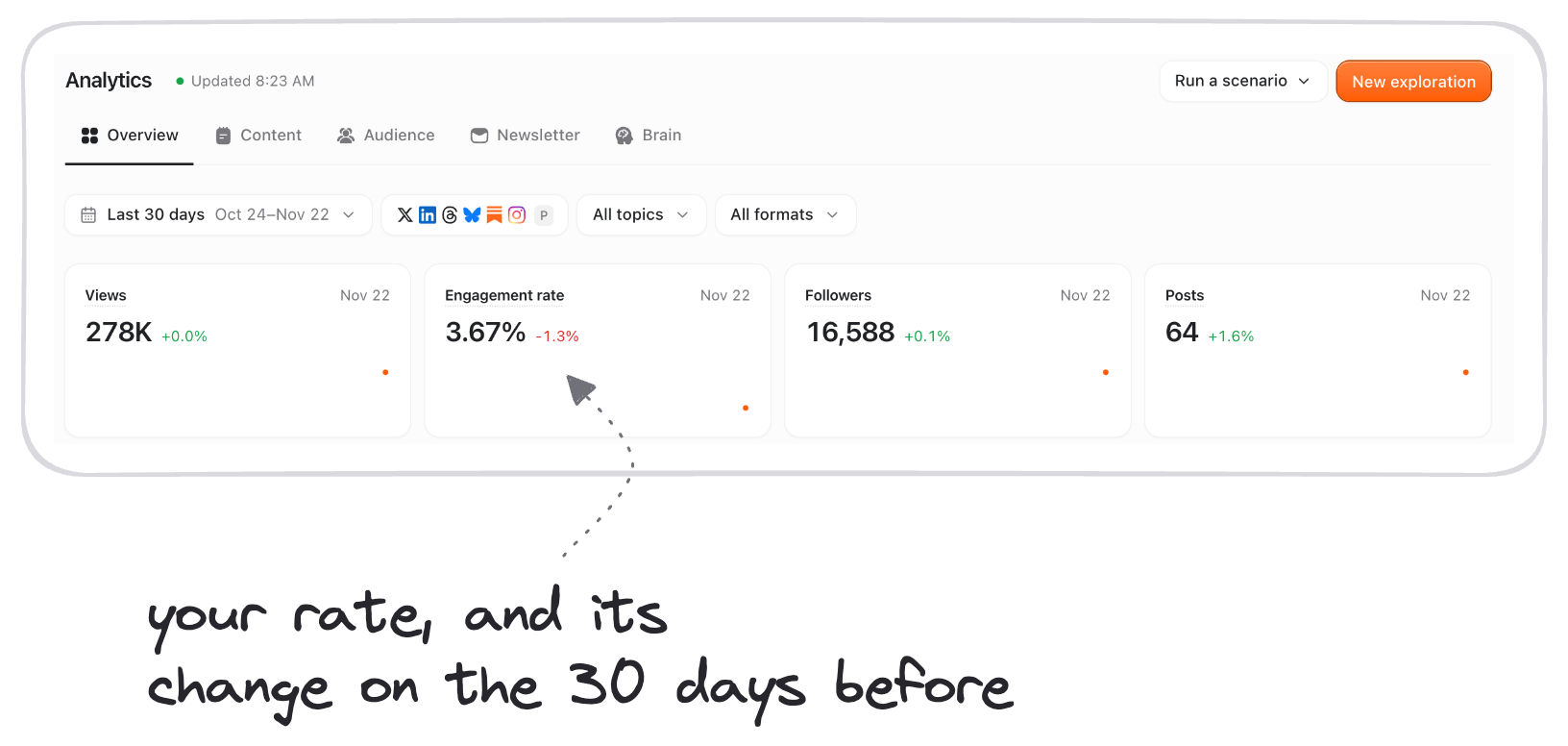
- The Engagement rate card. On the Overview tab, next to Views, Followers and Posts, with its change from the period before.
- Per post. Every post in the Posts table has its own engagement rate, and the pill turns green when it beats your average for the timeframe.
- Every platform. X, Threads, Substack and Instagram, plus LinkedIn and Bluesky, which share engagements but no views. The engagement rate only counts posts that have views.
- Ask Ty. Type "What were my best posts this month?" in Ty's chat and he lists your best posts across platforms, with each one's views and engagement.
- What brought followers. Pick Followers in the big chart and split it by topic or format to see which kinds of posts likely brought them in.
The rate there is engagement per view (likes and replies divided by views, from the posts that have views), so it's the impressions version from above.
That's where to find your Twitter engagement numbers: under each post on X, or all in one place in Typeshare.
7 Ways To Raise Your Twitter Engagement
Getting more replies on X comes down to a handful of habits you can repeat.
These are the ones I use on my own account, most of them straight from my current X posting cadence:
1. Reply to the first 3-5 comments yourself
I respond personally to the first 3-5 legitimate comments that come in on every post, to keep the conversation going around it. A reply from you invites a reply back, and a post with a live conversation under it keeps getting read. Skip the bots and the one-word replies; answer the people who said something. It takes five minutes, and it's the easiest habit on this list.
2. Quote post with a new take
One quote post a day, with a novel perspective. In my cadence, quote posts get the second most distribution of anything I post, and they let you stand out with an opinion of your own. Quote posts of viral tweets also borrow that tweet's distribution. Add something the original didn't say: a story, a number or a disagreement.
3. Publish Articles
One Article or long-form post a day. These are getting outsized distribution compared with everything else on X right now. Quote posting your own Article gives it another push, and so does quote posting someone else's. You don't need to write a new one every day: our weekly newsletter goes up as an Article, and older long-form gets a second life there. (Here's how to publish X Articles from Typeshare.)
4. Post 3 times a day, no more
Three posts a day is the volume sweet spot I've found. What we've seen: posting 5 times a day got roughly the same impressions as 2-3 times, and posting more seemed to lower the chance of one going ultra-viral. More posts split the same attention, so put the extra time into making three posts better.
5. Borrow bigger audiences
Find the big and mid-size accounts in your space, then curate, remix and build on their work. If they like what you made and repost it, their followers see you. Every time you post, only a fraction of your own followers sees it, so a repost from a bigger account is how new people find you.
6. Sharpen your hook
Your first line decides whether anyone reads the second, and nobody replies to a post they didn't read. Write 3 versions of the first line before you post and pick the strongest. Then look at your best posts from the last month and notice what their first lines have in common. (Here's how to write a hook.)
7. Make one clear ask
Pick one call to action and use it everywhere. On X, our "One" CTA is our Start Writing Online email course, because X readers are mostly new to us and a broad offer fits them. One ask, repeated, is easier to act on than a different link in every post.
You don't need all 7 on day one. Start with replying to your first comments, because it costs five minutes and works on every post you'll ever write.


Use these 7 ways to raise your Twitter engagement, and watch your own average climb.
FAQ
What is engagement on Twitter?
Engagement on Twitter (now X) is any action someone takes on your post besides seeing it: likes, replies, reposts, quote posts, bookmarks and, in some tools, clicks on your links, profile or media.
How do you calculate engagement rate on X?
Add up a post's engagements, divide by its impressions and multiply by 100. To compare with published benchmarks, divide by your follower count instead. The worked example above shows both.
Is 1% a good engagement rate on Twitter?
Against Rival IQ's 0.03% median for brands, 1% is far above average. Against Hootsuite's 1.8% average, it's a bit below. The better test is your own average: if 1% beats it, that post did well.
Why is my Twitter engagement so low?
Check three things first: a weak first line, posting at times your readers aren't on, and never replying to comments. Start by rewriting your hooks and replying to the first few comments on each post.
Do replies count as engagement?
Yes. Replies are the strongest kind, because writing one takes more than a tap, and replies turn a post into a conversation.
Does posting more raise your engagement?
Up to a point. In our experience, 5 posts a day got about the same impressions as 2-3, so I stick to 3.
Should I calculate engagement rate by impressions or followers?
By impressions, to compare your own posts with each other. By followers, only when you're comparing yourself with a published benchmark, since most of them divide by followers.
Do bookmarks count as engagement on X?
Yes, in most tools. A bookmark means someone wanted to come back to your post, which makes it one of the better signals that a post was useful.